Task batching: Reduce context switching and boost focus


Summary
Imagine opening your email on Monday morning and seeing a cluttered inbox, a stack of pending approvals, and feeling unsure about where to begin.
If this sounds familiar, you’re not the only one. Many people start their day by jumping into their inbox and handling the first message they see. However, this approach isn’t always the best use of your time.
Task batching can help you organize your work in a way that suits you. In this article, you’ll find out what task batching is, why it’s effective, its main benefits, how to get started, and tips for making it a habit.
How to align goals and OKRs across teams
Learn how to transform your team’s goals into measurable outcomes with powerful OKRs. When teams can understand how their work ladders up to the organization’s overall goals, better results follow.
What is task batching?
Task batching is a productivity strategy in which you group similar tasks and complete them in a single focused time period. Its main purpose is to avoid context switching, the mental cost of jumping back and forth between unrelated tasks.
The idea of context switching comes from computing, where systems handle several processes at once. Our brains do something similar when we switch between tasks, but it takes us real time and energy to get back on track.
Instead of tackling your to-dos as they come, task batching encourages you to group like tasks so you can complete everything for a similar project or work stream at once. This reduces the total number of context switches in your day and helps you work more efficiently.
Task batching vs. time blocking
Task batching and time blocking are similar, but each serves a different purpose.
Task batching groups tasks that are similar in nature or part of the same project into one designated time period. For example, you can choose to answer your emails in batches rather than as they come in.
Time blocking involves scheduling specific blocks of time in your day to focus on work. Using the email example, you can block off 1 hour every day solely for answering emails.
Task batching | Time blocking | |
Focus | What you work on (grouping similar tasks) | When you work (scheduling time slots) |
Flexibility | More flexible; batches can shift within the day | More structured; tasks are tied to specific times |
Goal | Reduce context switching between task types | Ensure every task has dedicated time |
Best for | Repetitive or routine tasks | Deep work or high-priority projects |
You can boost your productivity even more by combining both methods. Group similar tasks, then set aside a block of time to finish that group.
Why task batching works
Task batching works because it allows our brains to focus on one task at a time instead of multitasking. Dr. Sahar Yousef, cognitive neuroscientist and lecturer at UC Berkeley's Haas School of Business, says that multitasking is a myth. During a Focus & Flow event, Dr. Yousef stated, "the human brain works best when it focuses on one thing at a time. We have a certain amount of cognitive capacity and a certain amount of attention."

The human brain works best when it focuses on one thing at a time. We have a certain amount of cognitive capacity and a certain amount of attention.”
Task batching helps you use your focus to handle one type of task at a time. When you work through a batch, you don’t have to think about anything outside that group.
This matters because your brain takes time and energy to switch between tasks. It can take an average of 23 minutes to refocus after a distraction, and task batching helps you avoid this so-called "switching tax."
"The beautiful part about human attention and focus is that it's a precious, finite resource," Dr. Yousef says. "We do not have an infinite amount of attention. We have to be very careful about how we deploy that finite resource."
Read: How to focus: Tips to get things done in a distracted worldBenefits of task batching
If you're thinking about testing out a few productivity hacks, here's why task batching is worth your time.
Promotes deep work and focus
Deep work is a state of peak concentration that enables you to learn challenging material and produce high-quality work quickly. The term was created by Cal Newport, a computer science professor at Georgetown University. In his book, "Deep Work: Rules for Focused Success in a Distracted World," Newport defines deep work as a state of distraction-free concentration when your brain works to its maximum potential.
Task batching helps your brain block out distractions and focus on the task at hand, so you can work at your best. It makes it easier to get into deep work and stay there.
Read: 6 tips to harness the power of flow state at workDecreases burnout
Context switching not only interrupts your focus but can also increase your risk of burnout. The University of California Irvine discovered that working in an environment with constant interruptions increases stress and frustration. Constantly context switching increases the amount of cortisol your brain produces, which can leave you feeling mentally exhausted and burnt out.
Picture your workday as a hiking trail. When you stay focused, you keep moving forward. But if you keep stopping to wander off, it’s hard to see your progress. Your brain works the same way when you switch between tasks.
It’s also hard to see what you’ve finished when you’re always multitasking. By breaking your work into blocks, you and your team can clearly see what’s done. This helps you feel more accomplished and shows that your effort made a difference.
Read: Feeling overworked? Strategies for individuals and teams to regain balanceSaves time
If you're feeling overwhelmed at work because everything won't fit into one workday, task batching can help you catch up and minimize procrastination. Time blocks create a sense of urgency, helping you tackle challenging tasks rather than putting them off. The result is more free time in your day for the work that matters most.
How to task batch
Task batching is a simple technique to help you get through your to-do list and improve your time management. Here are the steps to successfully batch tasks.
Categorize your tasks for the day
Look at everything you need to do for the day and categorize tasks into similar groups. You can organize your tasks by the level of effort, by project, or by the type of actions needed to complete a task.
![[Old Product UI] To-do list example in My Tasks (Lists)](https://assets.asana.biz/transform/521709af-4500-44f9-af80-f83ff151fc5e/inline-make-better-to-do-lists-1-2x?io=transform:fill,width:2560&format=webp)
Tip: If you have a hard time switching between tasks during the day, try using the GTD method. This technique helps you offload some information from your brain onto an external source, so you don't have to waste energy remembering everything you need to do.
Block off time in your calendar
After grouping similar tasks, set aside enough time to finish them together. If needed, add this time to your calendar. This helps you stay committed and shows your team when you’re available or focusing.
For example, if answering emails and Slack messages takes 30 minutes, you can block off 30 minutes at the start, middle, and end of your day to handle them all at once.
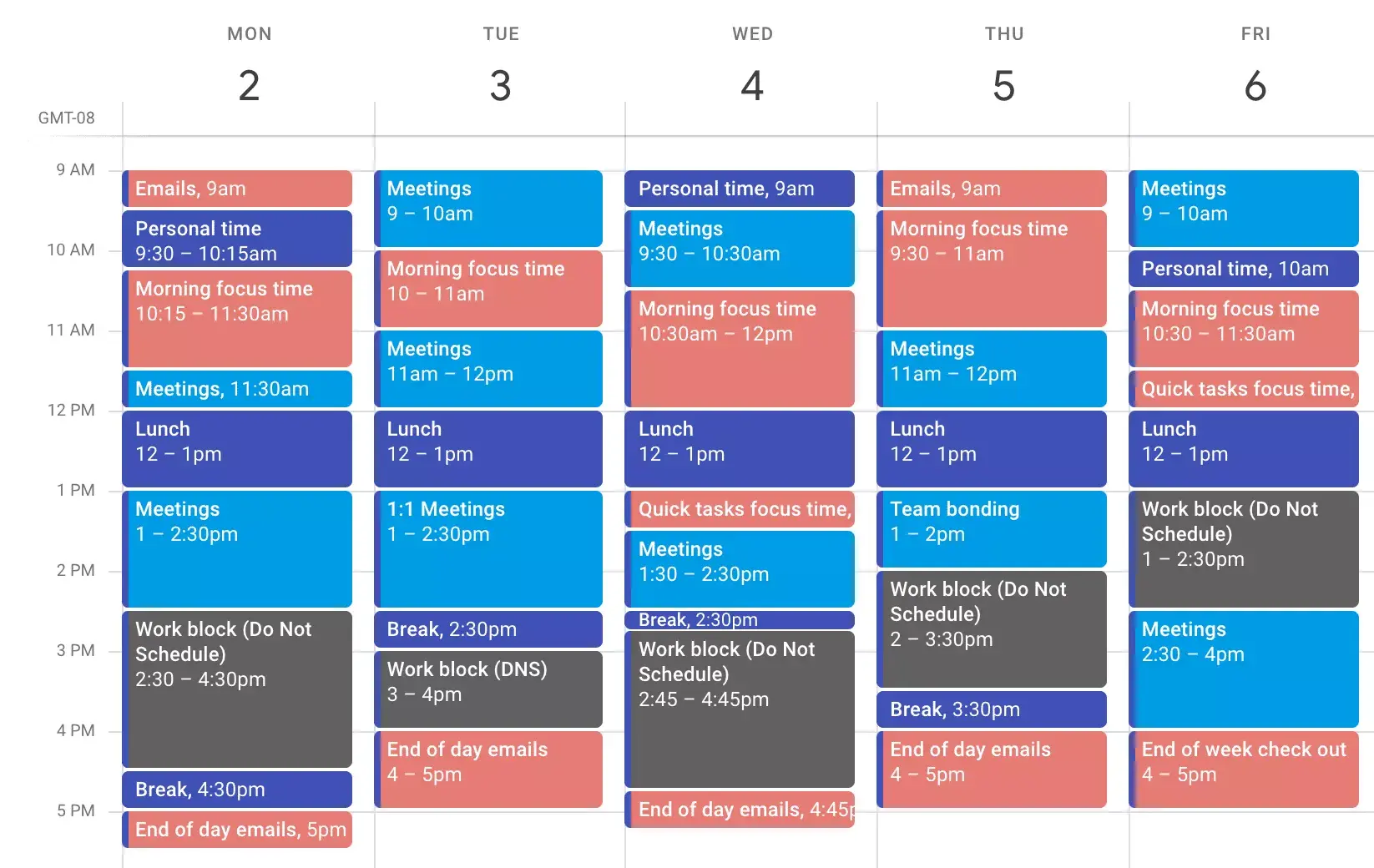
Tip: A common objection to time blocking is that employees want to be constantly available to their team. Using a time-blocking technique doesn't make you unavailable; it highlights the optimal time for your team members to reach you so you can give them your undivided attention. When creating your time blocks, don't forget to account for team meetings and meal breaks.
Create a daily planner templateColor code your blocks of time
Color coding your time blocks is optional, but it can help you quickly see how you’re spending your day. Use different colors for meetings, focus time, and one-on-ones to get a clear overview.
Read: 18 time management tips, strategies, and quick wins to get your best work doneExamples of tasks you can batch
Not sure where to begin? Here are some common types of tasks that are great for batching. Grouping them helps you stay focused and saves mental energy.
Communication tasks: Emails, Slack messages, and voicemails. Instead of responding to messages as they come in, set aside specific windows to handle all of your communications at once.
Administrative tasks: Expense reports, scheduling meetings, updating project statuses, and filing documents. These smaller tasks can pile up quickly, so batching them into one block keeps them from eating into your focus time.
Creative tasks: Writing blog posts, designing assets, or brainstorming campaign ideas. These require deep focus, so grouping them together helps you stay in a creative flow longer.
Review and feedback tasks: Reviewing documents, approving requests, and providing feedback on teamwork. Handling these in one batch lets you give them the attention they deserve without fragmenting your day.
Planning tasks: Setting agendas, outlining project plans, and updating timelines. Tackling these together gives you a clearer view of what's ahead and keeps your planning consistent.
The main idea is to group tasks that need similar thinking or effort. This way, your brain doesn’t have to switch gears as much, and you can get through each batch faster.
Tips for task batching
If you’re new to task batching, starting out might feel a bit challenging. Here are some tips to help you make the most of it.
Schedule mentally challenging tasks during peak time
Everyone has times when they think most clearly. Some people work best in the morning, while others feel more alert after lunch. Try to schedule your most challenging tasks, like brainstorming or planning, during your peak hours.
Minimize your distractions during focus hours
When you’re focusing, turn off notifications, close unnecessary apps, and use do not disturb mode. Even a small notification can break your focus, so try to prevent these distractions to support deep work.
If you get distracted by your physical workspace, take the time to clear your desk and set up your workstation so you can work most effectively.
Read: How to focus: Tips to get things done in a distracted worldCommunicate your focus hours with your team
It's important to let your team know when you're in a focus block so they know when to reach you and when to wait. Here are a few ways to signal your availability:
Set a status on Slack: Let your team know you're in a focus block and may be slow to respond.
Turn on an email auto-reply: A short message lets people know when they can expect a response.
Create a public calendar block: This shows your team exactly when you're available and when you're heads-down on focused work.
You can also let your team know other ways to reach you, such as assigning tasks asynchronously, so urgent matters aren’t missed.
Read: Asynchronous communication isn’t what you think it isIncrease productivity with work management tools
It's easier to be productive when you have the right tools in your workflow. Using a work management tool like Asana can help you keep track of your work so you know exactly who needs to do what by when. With features like task lists, calendar views, and workflow automation, you can organize your batched tasks, block off focus time, and keep your whole team aligned.
Ready to put task batching into practice? Get started with Asana and see how much easier it is to manage your work when everything lives in one place.
Create a daily planner template